


If you make a purchase after clicking on links within this article, Lee Enterprises may earn affiliate commissions. The news and editorial departments had no role in the creation or display of this content.
With an AI headshot generator for models, get crisp, clean headshots created by intelligent features. You upload your photo, select your style, and receive high-resolution results that may be suitable for portfolios, castings, or social feeds.
You bypass extended shoots, travel, or hefty expenses. For models who require multiple looks or refreshes, this tool could save you hours and keep you visible in a crowded industry.
Here are some recommendations for the best AI headshot generator platforms for actors and models.
Key Takeaways
People are also reading…
- Aim to effortlessly create professional and creative AI headshots from a single or multiple images to update your modeling portfolio, no photoshoot required.
- Fast turnaround. Most platforms may provide results in minutes or less than an hour, which is perfect when you need headshots in a hurry (times may vary for some).
- Many tools may offer customization, enabling you to fine-tune styles, backgrounds, and effects to create a tailored outcome that aligns with your branding.
- Test several platforms to discover the best balance of speed, style, and personalization that suits your needs.
1. Portrait Pal
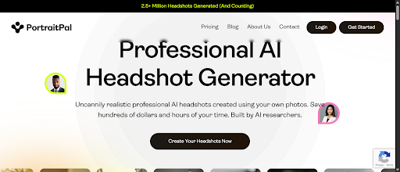
Portrait Pal is notable for making the process of acquiring AI-generated headshots potentially quick and effortless. All you have to do is upload a selfie, and it can provide you with a variety of headshot options.
Customization features may allow you to dial in the appearance of your headshots. Choose between various styles and backgrounds to suit your needs or express a mood. For instance, you may prefer a simple light background for agency submissions or a creative style for your social media posts. With Portrait Pal, the platform hands you these options without requiring advanced photo editing skills. Simply select your preferred style and the AI takes care of the rest.
If you desire high-quality pictures without the watermark, then the premium package may be for you. You have crisper shots and more options, so it is a stronger candidate for your portfolio or professional application.
2. Artbreeder
Artbreeder allows you to blend multiple of your own uploaded photos to create an extensive selection of headshot styles. Upload photos from varying angles, utilize group shots, or mix and match old and new headshots. The tool works by leveraging AI-powered genetic algorithms, splicing your uploads into one new headshot.
For instance, you may upload three selfies and mix them with a sample from the Artbreeder gallery, then adjust the blend to achieve a potentially balanced appearance. This genetic methodology means your outcomes aren’t arbitrary; they’re derived from your particular input, which may render every headshot more personalized and applicable for your modeling requirements.
Then there’s speed as a key advantage. Artbreeder’s platform may take your uploads and create new images within a few minutes. You don't need to wait hours for HD outputs (times may vary for some).
You retain significant creative influence on the resulting portrait. Artbreeder offers tools to modify facial features, skin tone, background colors, and artistic effects. Customization may extend beyond simple sliders. You can adjust the jawline width, raise or lower cheekbones, or change the lighting style.
An Artbreeder free account may be a great place to begin, which allows you to play with simple blends and a handful of adjustments. Paid subscriptions are available if you want to use high-resolution downloads, unlock more blend slots, or try advanced editing tools.
The free tier fits simple needs just fine, with the paid options catering to those who might require additional volume or power for professional projects.
3. Fotor
Fotor provides you with a potentially easy path to generate a batch of refined, professional portraits with zero learning curve. All you have to do is upload five or more photos. The more you upload, the better the AI may be able to blend your attributes and avoid strange outcomes. For instance, you might upload shots from different angles or with alternate lighting.
You may receive your completed headshots in less than an hour, often in seconds. This rapidness is beneficial when you require a last-minute refresh for a casting or agency request (times may vary for some).
You get to select different backgrounds. For example, for a model portfolio, you may desire a clean white or soft color background. If you want something a bit moodier, Fotor allows you to transition to a darker shade or even throw in a studio-like background. You can use text prompts to help steer the AI, like requesting “natural light” or a “studio look.
If the initial batch is off, you can use the free re-gen feature. You can keep trying until you’re happy with the results. Fotor provides you with a free trial, which appears to include most features.
You’ll get bonus credits just for checking in daily, so you may not be limited if you want to sample additional styles. Once the trial ends, the paid plans appear to be reasonable and reveal all the custom styles, backgrounds, and editing tools. Free credits reset every 24 hours, so you may continue creating headshots without additional fees.
4. DeepAI
Next up, DeepAI is great for potentially fast, high-quality headshot generation with simple acts and extensive options. You begin by uploading one or more photos, which allows the AI to learn your traits. The platform may be able to handle either a single image or a sequence, which is convenient if you want to display multiple expressions or perspectives.
For models, this may translate into crisp, studio-quality headshots that fit portfolios or casting calls. All you have to do is tap “Generate Image” and watch the AI go. You could receive results in minutes. The acceleration implies you may not need to spend hours in the queue.
It is really handy if you need fresh headshots fast for a new gig, casting call, or social profile. DeepAI’s swift delivery fits perfectly into hectic schedules, freeing up time for you to attend to other priorities.
Customization appears to be what separates DeepAI. You may utilize a variety of powerful tools to customize headshots. Options include changing backgrounds, adjusting lighting, and tweaking facial features.
The website provides options for various art styles, including Realistic, Anime, Painterly, Surreal, and Minimalist. For instance, if you desire a polished, studio-style headshot, you can select Realistic. If you want a more creative social media look, Anime or Surreal may be a better fit.
The interface provides you with obvious controls, so you can make minor adjustments without restarting. The free AI headshot generator provides an opportunity to test the service with zero risk. According to the app, you retain 100% of the rights for any image you generate, even on the free plan.
Need more capabilities? DeepAI sells reasonably priced upgrades. These could be higher resolution, more customization options, or priority processing. You get to decide what suits your needs and financial constraints.
5. Avatarify
Then, Avatarify shines for its customizable avatar generation with a wide selection of aesthetics to choose from. You begin by uploading one or even forty photos, depending on the complexity of your avatar. The more photos you upload, the more personalized and precise your avatar may become.
Use seven to generate an easy but still personalized digital headshot, while the option of forty gives the system more to work with to capture your features. Choose from packable styles like Analog Film for a timeless feel, 3D Model for the cutting edge, or Fantasy Art if you’re feeling daring. These options may allow you to develop a digital avatar of yourself that suits your style or the mood you desire for your portfolio.
Avatarify typically delivers results in 1 to 2 hours, but it can take as long as two days, depending on the queue. Most users may receive their avatars within a day.
In terms of price, Avatarify provides a few freebies for simple avatars. Premium functionality, such as advanced editing capabilities or higher-quality picture exports, is charged a nominal price. This may allow you to sample the service without an initial outlay. You’ll likely want to pay if you need additional control or professional resolution. You should explore these options to see what may work best for you.
Note: Brand names are provided as examples only and are not endorsements. Always review each provider’s current Terms, Privacy Policy, licensing, and pricing.
Conclusion
When it comes to choosing the right AI headshot generator for models, you have some good options. Each one serves a different purpose. Need fast edits? Maybe give Fotor a shot. Want tailor-made looks? Artbreeder may provide sliders to experiment with styles. Portrait Pal and Avatarify could add playful twists for social profiles. DeepAI may provide easy-to-use tools with step-by-step guides, ensuring you’re never confused. These choices work to enable you to save time, trim costs, and obtain crisp results for your modeling shots. All of them work online, so you may use them from anywhere. Give a couple of them a whirl, find what suits you best, and allow your photos to reflect your authentic self.